


A score for your band, from any recording.
Play it, record a rehearsal or open a file you have. Brasscribe writes down the parts for your brass band, shows you the notes it wasn't sure about, and lets you practise along with the band.
Runs on
- iPhone and iPad (test build)
- Mac
- Android
- Windows (preview)
How it works
From recording to score, one step at a time.
Brasscribe asks one thing at a time and never guesses. Nothing changes until you press a button.
-
Open or record
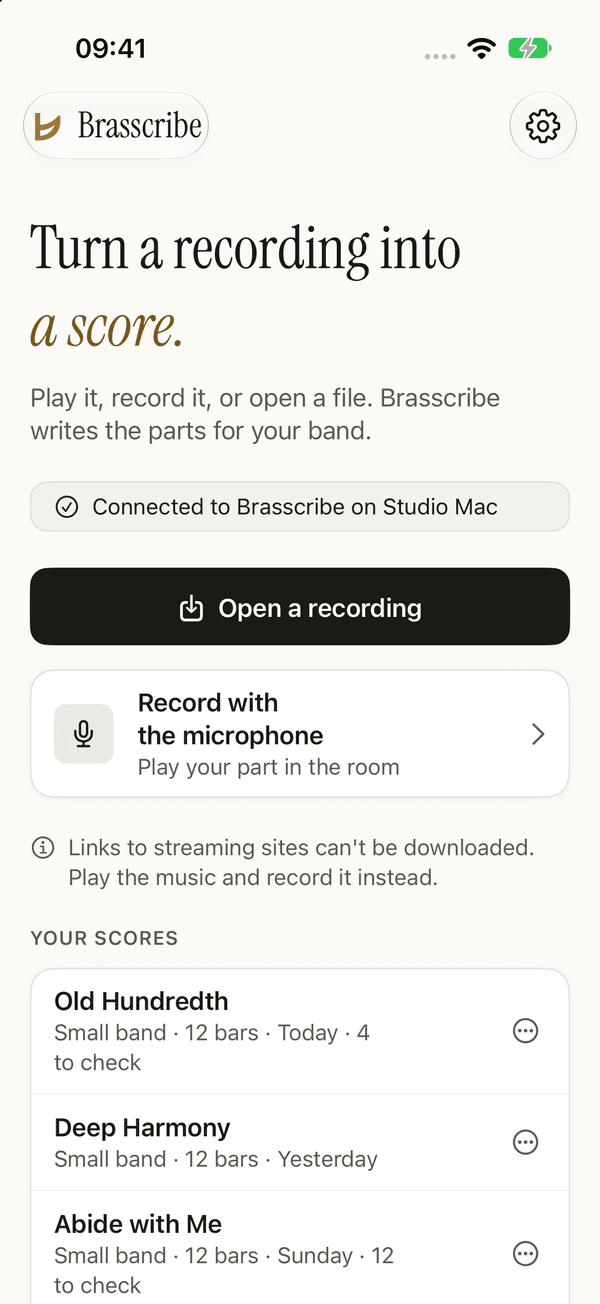
Open a recording you have, or record the rehearsal with the microphone.
-
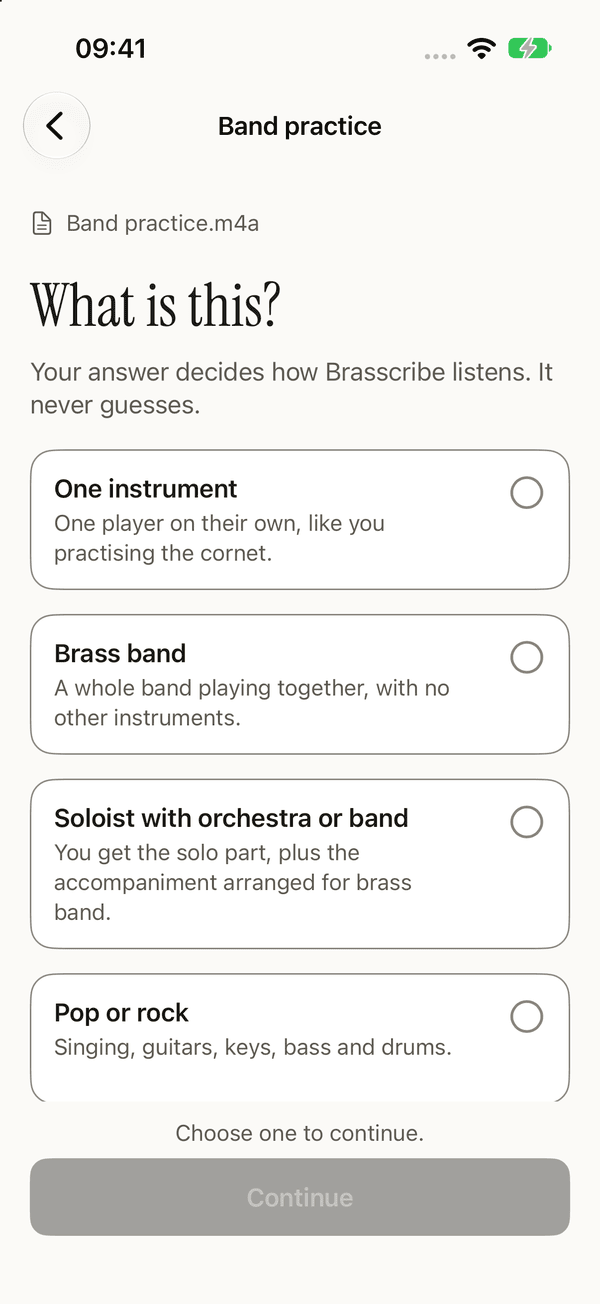
What is this?
One instrument, a brass band, a soloist with orchestra or band, or pop and rock. Your answer decides how Brasscribe listens.
-
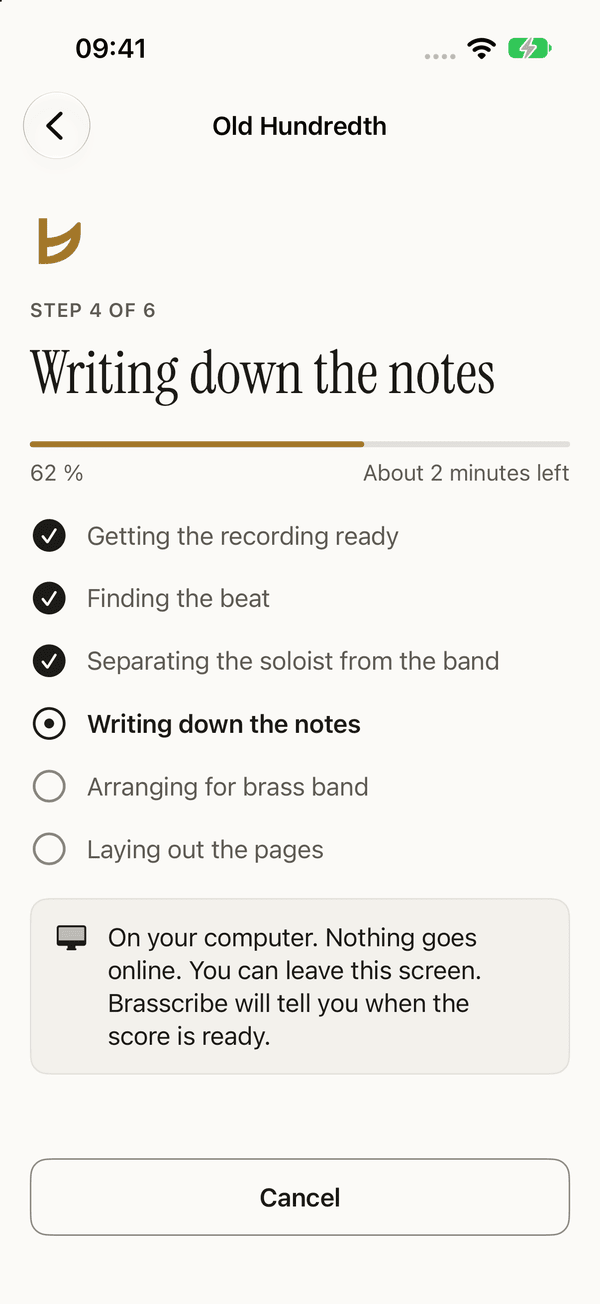
Making the score
Each step in plain words, with the percentage and the time left. You can leave the screen; Brasscribe tells you when the score is ready.
-
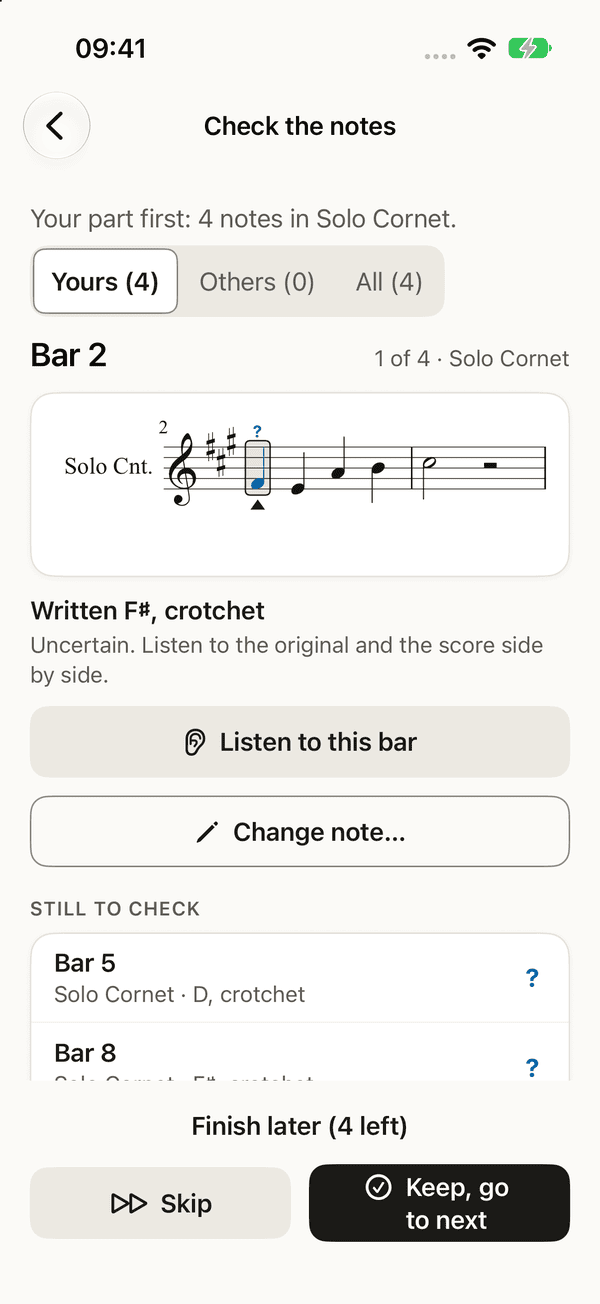
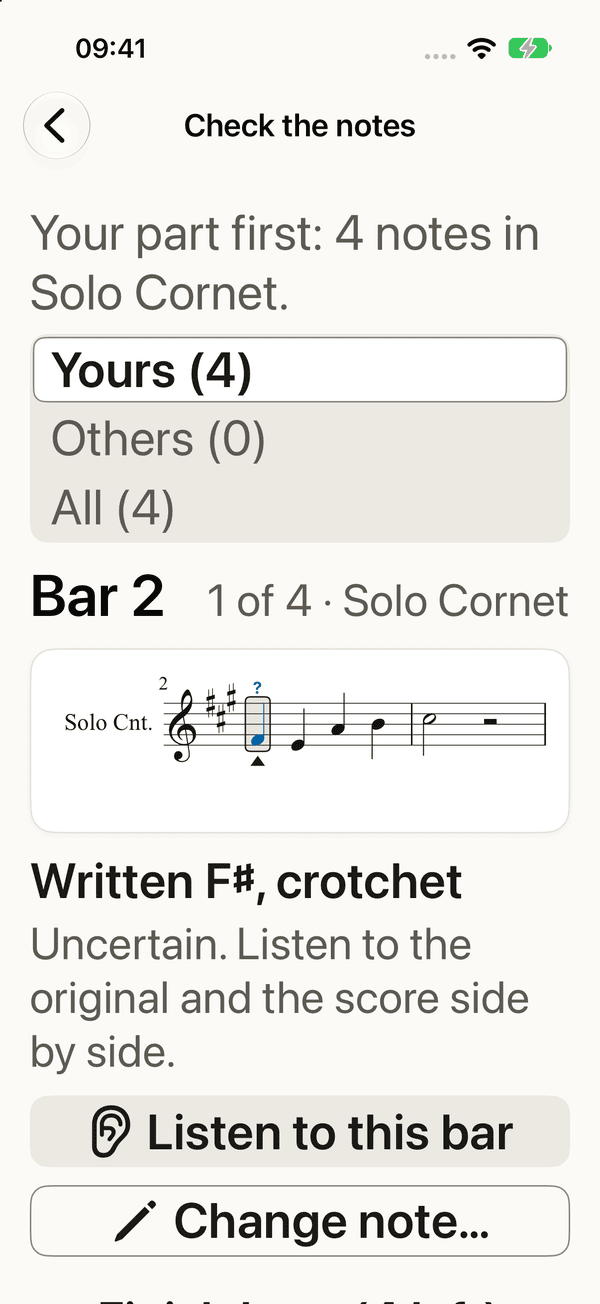
Check the notes
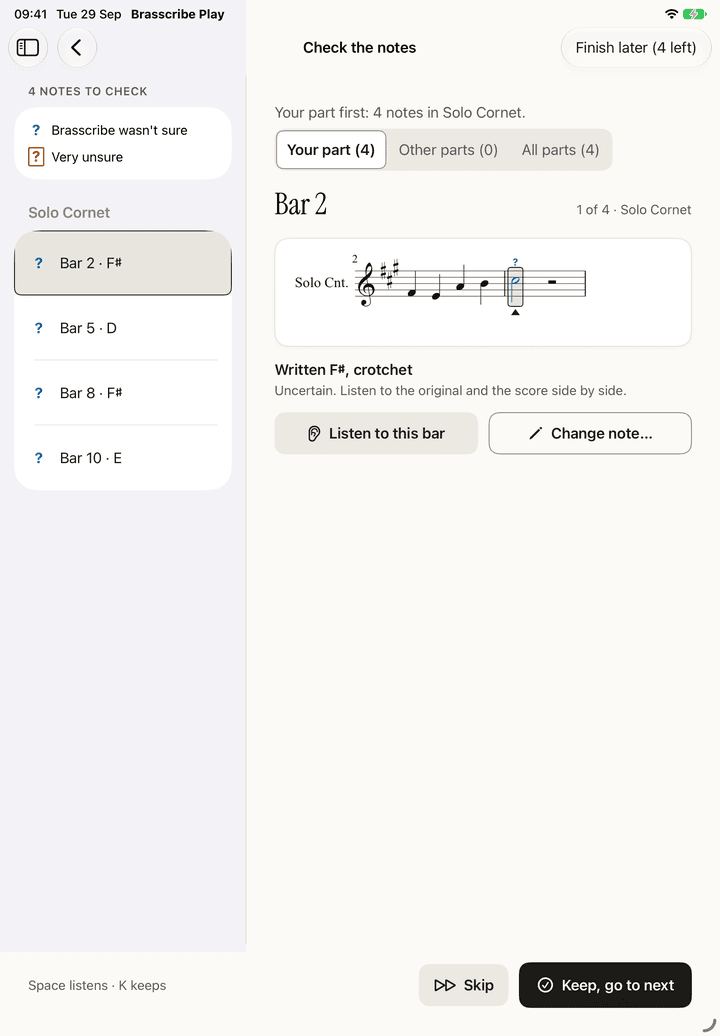
Notes Brasscribe wasn't sure about get a . Start with the very unsure ones in your part. Listen to the bar, then keep or change the notes. Or finish later.
-
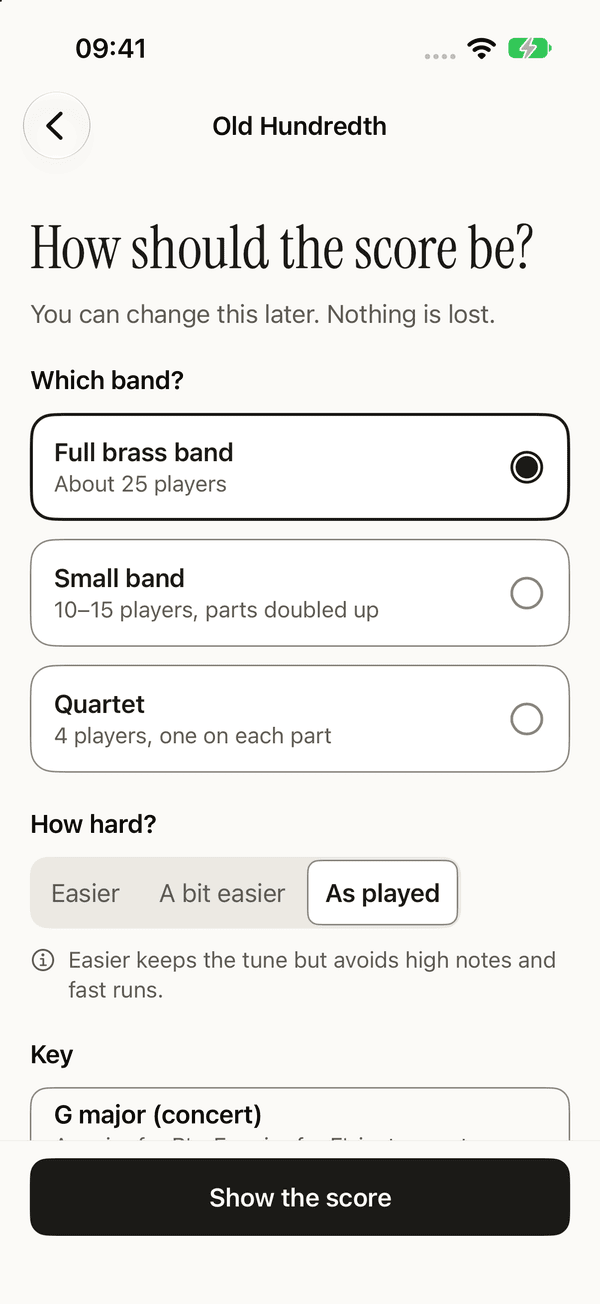
How should the score be?
Full brass band or a small band, easier or as played, and the key you want. You can change it later. Nothing is lost.
-
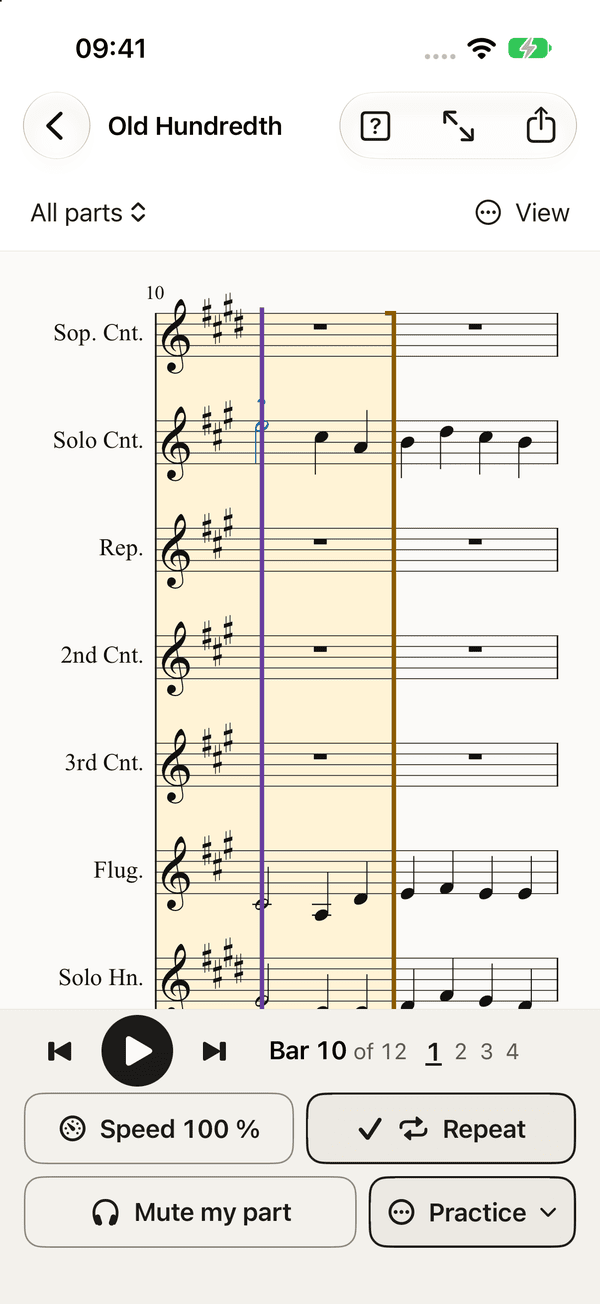
Score and play along
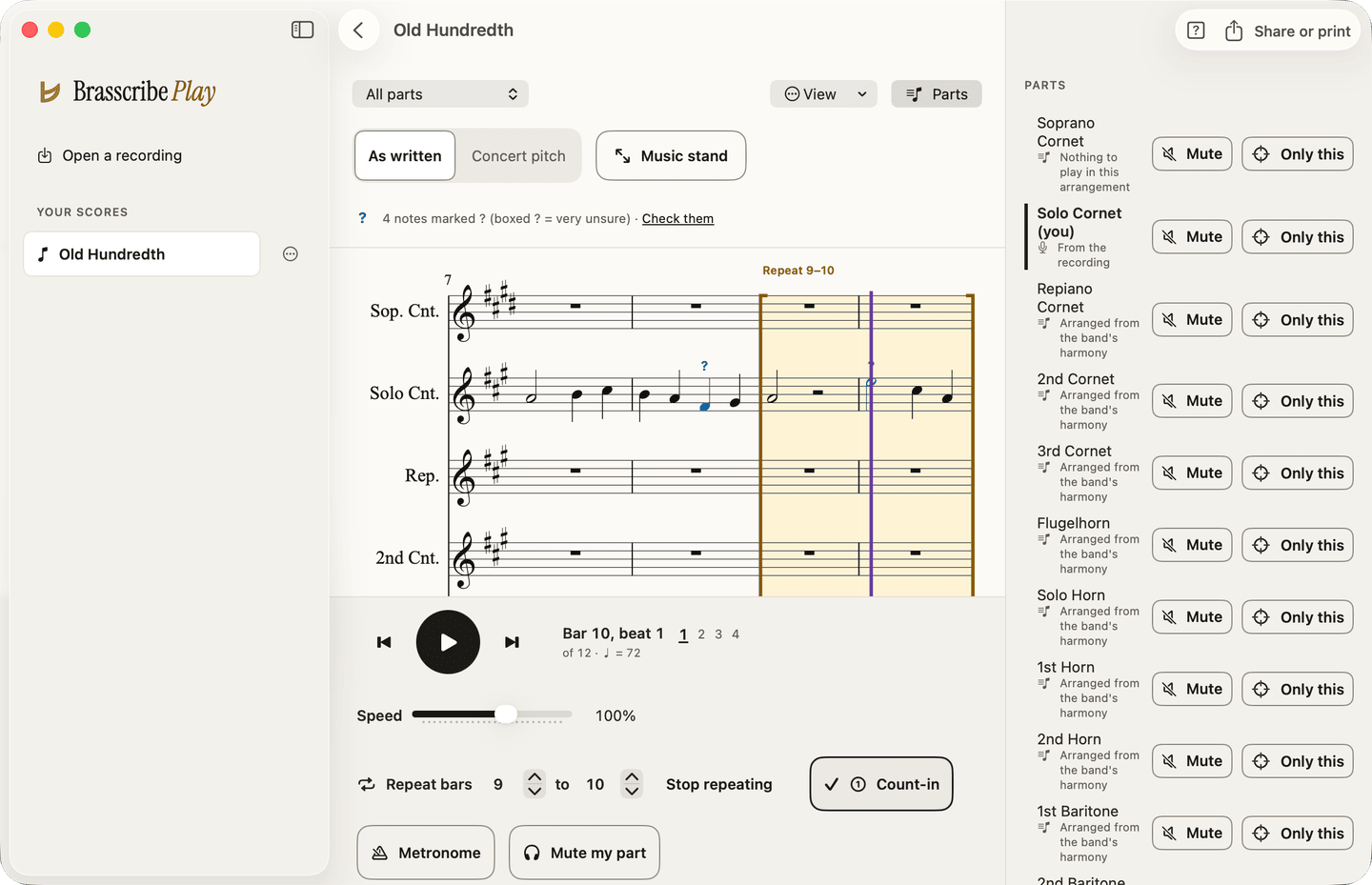
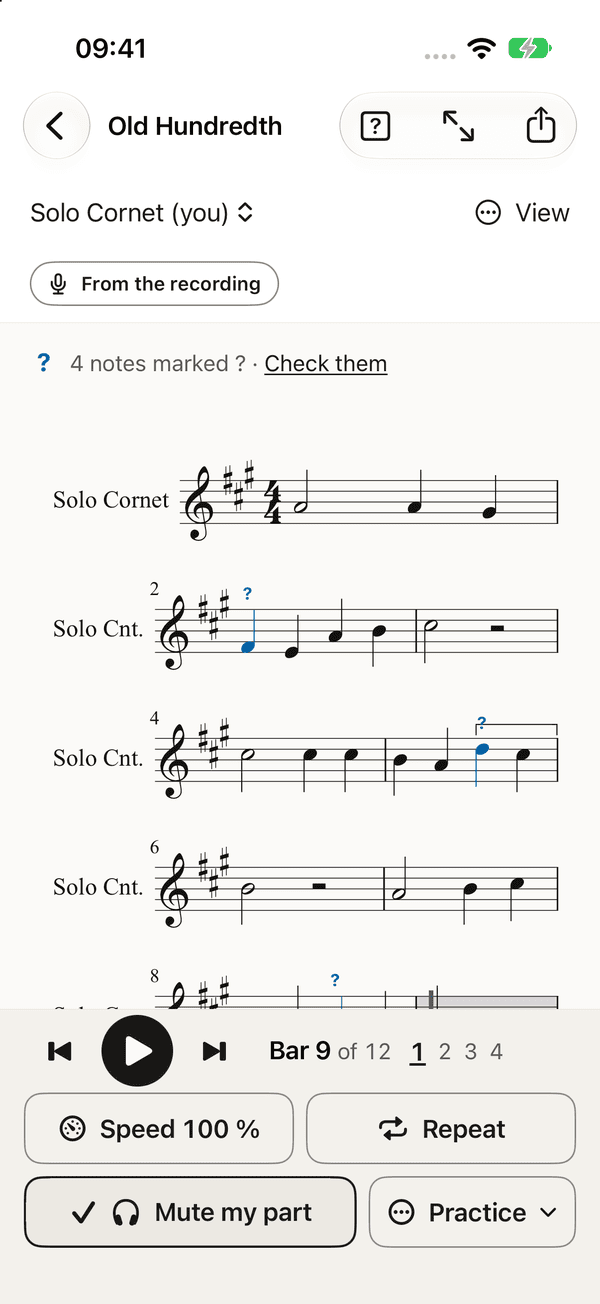
The whole band plays back. Read it as written for your instrument or at concert pitch, and practise with the controls under the score.
-
Your part
Brasscribe asks once what you play, and opens every score on your part, as written for your instrument. Mute my part lets the band play around you, and in the parts list Mute and Only this work part by part.
-
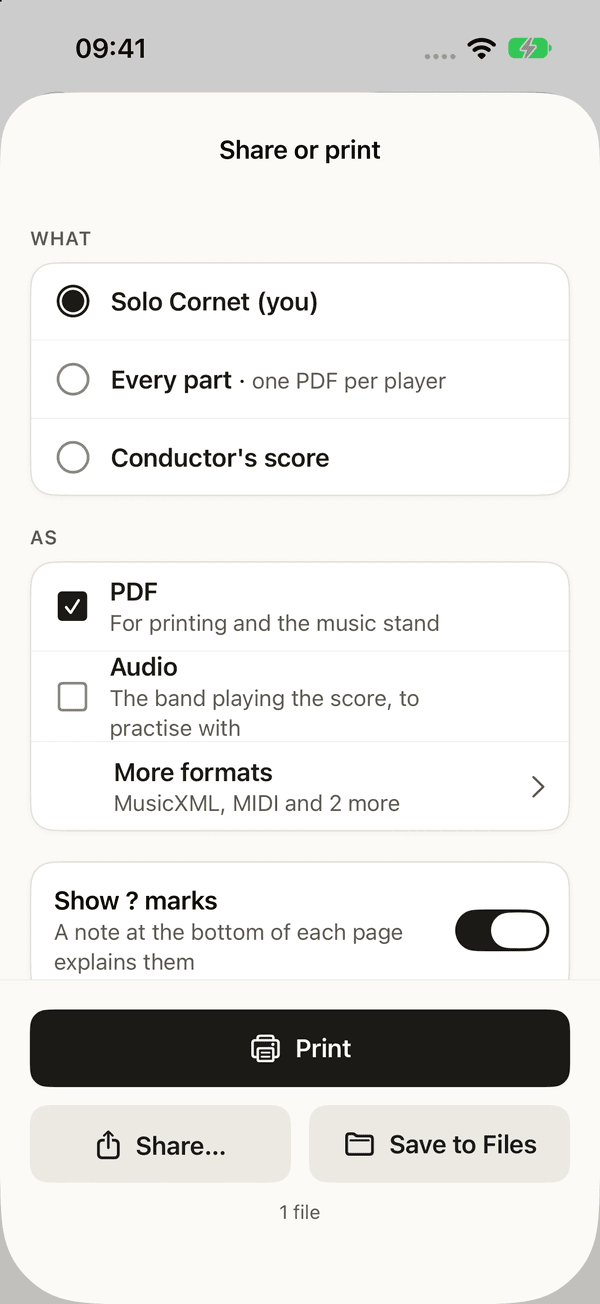
Share or print
Your own part, every part or the conductor's score. As a PDF for the music stand, audio, MusicXML, MIDI, a talking score or braille music.
Practise with the band
Mute your part and play along.
Every part plays back with brass sounds. Mute your own part and play it yourself, or hear one part alone.
- Speed: anywhere from 25% to 150%.
- Repeat bars 9 to 10 until the hard passage sits.
- Count-in and Metronome when you want them.
- Mute my part so the band plays around you.
- On iPhone, iPad, Mac and Windows, switch to the original recording at the same place to check what the band really played.
Made for bands
Everything a section leader would want.
-
Written for your instrument
See every part as written for B♭ or E♭, or switch to concert pitch. Cornets, trumpet, flugelhorn, horns, baritones, euphoniums, trombones and basses, each in its usual clef.
-
Honest about doubt
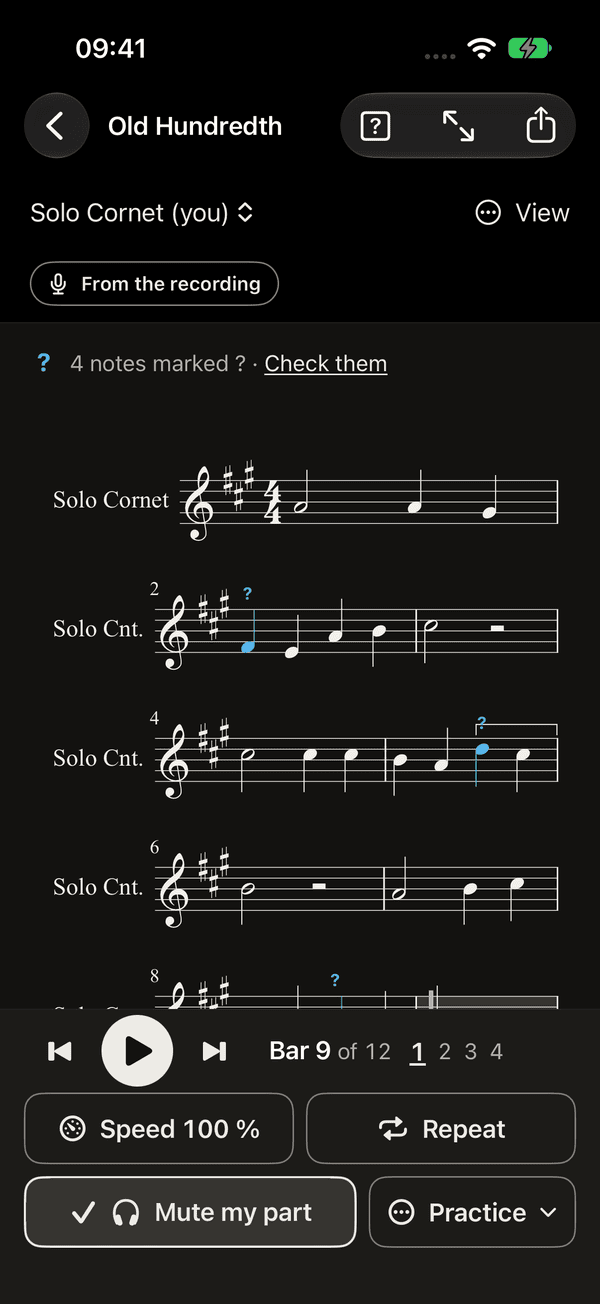
A question mark means Brasscribe wasn't sure. One in a box means very unsure. The marks stay in what you share until you've checked them.
-
Share or print
Print your own part, a PDF for every player, or the conductor's score. Also audio to practise with, MusicXML for MuseScore, Sibelius or Dorico, and MIDI.
-
Record what's playing
Record the rehearsal with the microphone, or just open an audio or video file. On Android, Mac and Windows, you can also record the sound of another app.
-
Open a score you have
Open MusicXML from MuseScore, Sibelius or Dorico and practise with it the same way: your part, your speed, the bars you need.
-
Stays with you
Recordings stay on your phone and your own computer. In English and Norwegian.
For every musician
Readable, audible, and yours to adjust.
- Works with VoiceOver, TalkBack and Narrator. Progress and changes are announced.
- Follows your text size, all the way to 200%, and dark mode, high contrast and reduced motion.
- Uncertain notes are marked with a shape, never colour alone: for unsure, a boxed for very unsure.
- Read aloud turns the score into a talking score, bar by bar, in words. Share it as text or as braille music.
- On a computer, everything works from the keyboard.
Where it runs
Your phone, and your computer.
A full brass band is always written by Bandroom, a free program on your own Mac or Windows PC, on the same Wi-Fi as the phone. It does the heavy work and sends the score back. A single instrument is written by the app itself on Android and on a Windows PC. On iPhone, iPad and Mac the app does not carry what it listens with yet, so a solo goes through the computer too.
A score you already have opens, plays and prints without the computer. Play runs on the newest system and the one before it: Android 17 or 16, iOS, iPadOS and macOS 27 or 26, and Windows 11. It is not in any app store and the downloads are not signed yet; the download page says how to install each one anyway.
Open the app's settings and your computer shows up by itself. Type the six-digit code it shows, and you're connected.
On a Mac, the whole band fits on the screen, with Mute and Only this for every part beside the score.
Brasscribe Studio
The workbench for the band's tech person.
Studio runs in your browser, served by Bandroom on your computer. It shows every step of a run, so you can see why a note came out the way it did.
-
Every stage, inspected
Choose a stage to see its files, time and device. Look at the stems, piano roll, beats, voices and MusicXML behind the score.
-
Compare two runs
Notes are matched part by part: identical, added, removed, moved or an octave off, and shown side by side in the notation.
-
Measured, not guessed
Run the benchmarks on recordings with known notes, and check that the apps give exactly the same score as the engine.
Under the hood
From sound to score, in six steps.
Between the recording and the score, Brasscribe runs a fixed chain of steps. Audio models listen, and plain music rules write the notes down. Every step can be checked against real recordings.
-
Choose how to listen
Your answer to “What is this?” picks the path. A solo or an all-brass band is heard as it is. For a full band, the recording is first split into separate layers.
Pop and rock: a separator splits six layers (vocals, guitar, piano, other, bass, drums). Soloist with orchestra: a second separator pulls out the solo, bass and drums, and the orchestra is what is left.
-
Find the beat
A beat tracker marks every beat and the first beat of each bar. Brasscribe picks the level a musician would count, cleans up stray beats and reads the time signature from the bars.
A beat tracker finds beats and the first beat of each bar. Where the tempo is unsteady for several beats, the passage is written as ad lib. with dashed bar lines instead of being forced onto a grid.
-
Hear the notes
Several transcribers listen to each layer on their own and each writes down the notes it hears. Notes where the layer is silent are dropped.
One model hears many instruments at once, one hears chords on any instrument, and one follows the pitch of a single line. That pitch curve also tells where a held note really ends.
-
Agree on the notes
A note the transcribers agree on is almost always right. A note only one of them heard is often wrong. The level of agreement becomes the note’s confidence, and the confidence decides the marks.
Notes are matched by onset time and pitch. The confidence is a probability that the note is right, learned from recordings with known notes. Below about 0.76 the note gets a ?, below 0.4 a boxed ?. In our benchmarks on solo brass instruments, between one in six and one in three of the wrong notes carry a mark, and none on the horn, so a note without a mark can still be wrong. How it is worked out.
-
Write it down
Played music is never exactly on the beat. Brasscribe moves each note to the nearest rhythm a player would read, keeps rhythms simple where that is honest, and names every note in the right key.
24 ticks per beat, dynamic programming that penalises complex rhythms, written vs played length (staccato when under half). ps13 pitch spelling at concert pitch; key from Krumhansl–Kessler profiles.
-
Arrange and engrave
The notes are shared out over the band’s parts, each in its range and written for B♭ or E♭. Dynamics come from how loud each layer is, bar by bar, with rehearsal marks at the sections.
Parts are assigned by role (tune, bass, harmony, rhythm), range and voice leading. Output as MusicXML, PDF, MIDI, audio, braille and a talking score.
The thinking behind it
Why it works this way.
No model knows a brass band
Every open transcription and separation model stops at trumpet, trombone, tuba and horn. None knows a cornet, a tenor horn, a baritone or a euphonium, and none can pull three cornets playing in close harmony apart. So the models only answer “which notes sound when”. Which part plays each note is decided by music rules we wrote: range, role in the texture, and smooth voice leading.
Several opinions beat one
Each transcriber makes different mistakes. When two of them hear the same note independently, it is right about 9 times in 10. Confidence is worked out as 1 − (1 − p₁)(1 − p₂)…, where p is how often each model has been right on our test recordings. That is why Brasscribe can tell you which notes to check, instead of pretending every note is certain.
Separate only when it helps
Splitting a recording into layers helps when a trumpet has to be heard over guitars and drums. On an all-brass recording there is nothing to split, and splitting only adds noise. We measured both paths and kept each where it wins.
Audio models listen, rules write
Only the listening uses machine learning. Beat grids, rhythm, note names, keys, parts and layout are deterministic: the same notes always give the same score, byte for byte, on every platform. Language models are never used to produce notes; they cannot hear pitch reliably.
How we know
Every choice above was settled by measurement on recordings with known correct notes, and every change is checked against the same recordings before it ships.
| What | Result | Tested on |
|---|---|---|
| Notes found (onset F1, 100 ms) | 0.88 chamber brass, 0.75 brass quartets | Real brass chamber music and brass quartets |
| Notes the models agree on | 89–92% correct on mixes, 91–99% on a solo line | Real brass recordings and separated solos |
| Splitting a full band first | +8 to +12 F1 points | Band songs with a trumpet lead |
| Notes on the right beat position | 95–99% with a correct beat grid | Real brass quartets and chamber music |
| Note names (sharps and flats) | 99.9% correct | Real brass quartets |
Details for the band’s tech person
The engine runs each recording as a graph of stages (beats, stems, transcription, arrangement, export). Every stage is cached by the hash of its inputs, settings and code, so changing the key or the band only re-runs the arrangement. Each audio model runs in its own isolated Python environment behind a file-based contract: audio in, MIDI or JSON out.
The music rules are written once in Python as the reference and ported to Rust for the apps on iPhone, iPad, Mac, Android and Windows. A conformance suite checks that the Rust port gives identical scores, MusicXML and talking scores. A solo can run entirely on an Android phone or a Windows PC; the heavy separation and transcription models run on your own computer.
The research notes, benchmarks and source are in the repository.
What it can’t do yet. A melody hidden in an inner voice is hard to find. Long free-time passages can still be pushed onto a beat. Staccato is guessed from note length, not from the sound of the attack. That is exactly what the ? marks are for.
Try it with your band.
Brasscribe Play is in early testing. The latest version can be downloaded for Android, Mac and Windows; the user guide shows how to install it and connect your computer.
Play guitar or bass? That is Fretscribe.
Fretscribe is Brasscribe's sibling for guitar, bass, ukulele and mandolin: it turns a recording into tab, in your tuning. It uses the same Bandroom on your computer, so one computer serves both apps.